Validation
An image model can change a product without saying so: a print redrawn, a hem a little longer, a pocket that was not there. For a catalog that is not a detail, it is a return. Reica puts a validation layer around every image, so that what reaches your shop matches what you sell and was approved by a person.
The checks run at five moments.
| When | What Reica checks | What you see |
|---|---|---|
| 1. Before generating | The photo, the sides it shows, the category | Photo check, Coverage, a warning before you pay |
| 2. While generating | The garment's measured shape and length | Nothing to do: it is built in |
| 3. After generating | The image against your photo, and its own defects | Quality check score and defects |
| 4. Automatic fix | One correction when the score is under your threshold | "auto-fixed" next to the score |
| 5. Your approval | A person decides; nothing unapproved leaves | Review, approval-only export |
1. Before generating
Photo check. When you add photos, each one is checked against the seven photo guidelines: one product, the whole garment in the frame, a front view, a plain background, at least 2000 px, sharp and evenly lit, nothing pinned. The check advises and never blocks you.
Front photo verdict. On the product page the front photo is marked as good, could be better, or worth retaking, with the reason: blurry, cropped, partly hidden, glare, low detail.
Coverage. Reica knows which sides your photos show. When you ask for a view no photo shows, such as the back without a back photo, it says so before you generate: "No photo of the back: it will be imagined." You decide whether to add the photo first.
Category. The category is detected from the photo, with how sure Reica is. Below a safe level it is only suggested, and you confirm it. The category decides how the garment is isolated and measured, so it is never guessed silently.
2. While generating
The garment is measured. Before the image is made, Reica measures the garment in your photo, separate from the hanger, the wall and the pins, and gives the image model the garment alone. This keeps the model from copying the hanger or misreading the length.
Proportions are held to the photo. A still life that comes out longer or shorter than in your photo is corrected: up to a quarter longer, it is brought back to the photo's proportions; beyond that, or shorter, it is made again.
Length on the body. For dresses you choose where the hem falls on the model (knee, mid-calf, ankle or floor) or keep it as in the photo. Without a choice, Reica works the length out from your photo.
On-model starts from an approved product. An on-model photo is made from the approved front still life, the clean garment, and the other views your photos show. Reica tells the model never to add what no view shows.
3. After generating
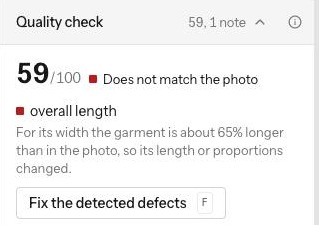
Every catalog image is compared with your product photo and gets a score out of 100.
| Score | Means |
|---|---|
| 85 and over | Matches the photo |
| 60 to 84 | Check the details |
| Under 60 | Does not match the photo |
What is checked
-
Fidelity: print, logo and text, colour, shape, missing or added parts, or a different product altogether.
-
The image itself: edges, a leftover hanger, tag or background, stains, warped areas, a floating shadow.
-
Measured, not guessed: a product cut off by the frame and proportions that differ from the photo are measured on the pixels, because a visual judgement misses them.
-
Hem position: for dresses, where the hem falls on the model compared with the length you chose.
-
Outfit: on an on-model photo, each garment you chose for the outfit is checked one by one: worn as chosen, missing, different, outside the frame, or could not be confirmed.
-
The words on the garment: the text of a label or a print must read as in your photo. See the words on the garment.
Each defect comes with where it is, what is wrong, how to fix it, and how serious it is:
- Not publishable caps the score under 60;
- A shopper would notice caps it under 85;
- Minor caps it under 95.
So a faithful product in a flawed image is flagged too, and a high score always means no serious defect was found.
The outfit check is kept apart from the score: a perfect product with the wrong trousers still scores high, and is still flagged.
The words on the garment
Image models rewrite small text: a brand name in the neck can come out as a different word. Reica reads the words on the garment once from your photo (a neck label, a printed word, a stamp), then, after each still life is made, reads the same places in the image and compares them with your photo.
- At 1K a rewritten word is a defect that a shopper would notice, so the score stays under 85 and the image gets its automatic fix, which names the text to copy exactly.
- On 2K and 4K versions a version that changes the text is drawn again once; if it still changes it, it is not kept and your credits are refunded.
- What is not checked. Hanging tags, price tags, stickers, barcodes and packaging are not on a catalog image, so they are not checked. Small lines such as size, composition, care and origin count only when they are readable in both your photo and the image; a very short word, such as a size, is skipped.
- Add a close-up of the label to the product (the label photo) and Reica uses it as the reference for the text, and lays the label where you place it.
- Only still lifes are checked: on a model the label is usually hidden or turned.
4. Automatic fix
When an image scores under the threshold of its brand profile, Reica makes one attempt to fix what it found, at no extra cost:
- the defects are fixed as an edit of the image, with the product photo as the reference;
- wrong proportions are made again rather than edited;
- the new image is checked again, and kept only if it scores higher and loses no garment of the outfit. Otherwise the first one stays.
A fixed image says auto-fixed next to its score, and Review shows what was fixed.
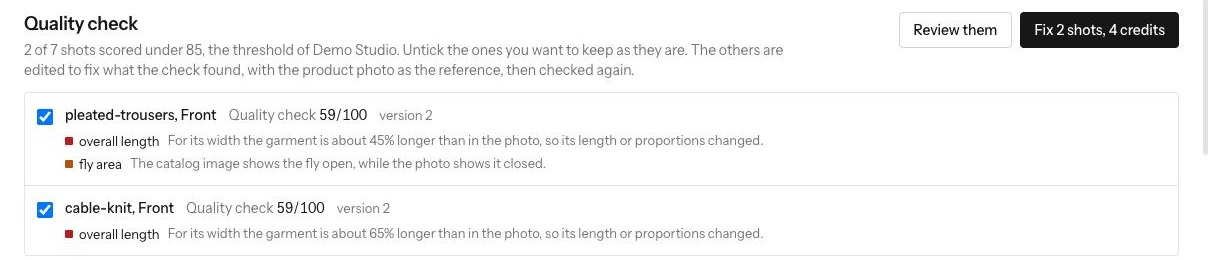
At the end of a batch, the images still under the threshold are listed with their defects. You choose which to fix, see the cost, and confirm. Nothing is fixed and charged without your confirmation.
5. Your approval
The checks narrow down where to look. The decision stays with a person.
- Every image waits for review. It is approved, rejected or changed in Review, next to your photo, at full size.
- Bulk approval keeps the risky ones back. Approve all remaining leaves out every image under 85 and every outfit that needs a look.
- Every version is kept. A correction never replaces an image silently: the earlier versions stay, with their scores, and you can go back to one.
- Only approved images leave Reica. Downloads, exports and Google Drive transfers refuse an image waiting for review or rejected. This is enforced on Reica's servers, not only hidden in the interface.
- Every image is declared. Exported images carry a mark in their file data saying they were generated with AI, and the export manifest lists each file with its score and the disclosure, as the EU AI Act asks.
What validation does not promise
The checks are measured on real catalog images and catch what matters most, but they are not a guarantee: a small change can pass. Look at each image before you approve it. Validation tells you where to look first.