Generate
You can generate one product from its page, or many products at once in a batch. Both use a brand profile; the cost in credits is shown before anything starts.
One product: the product page
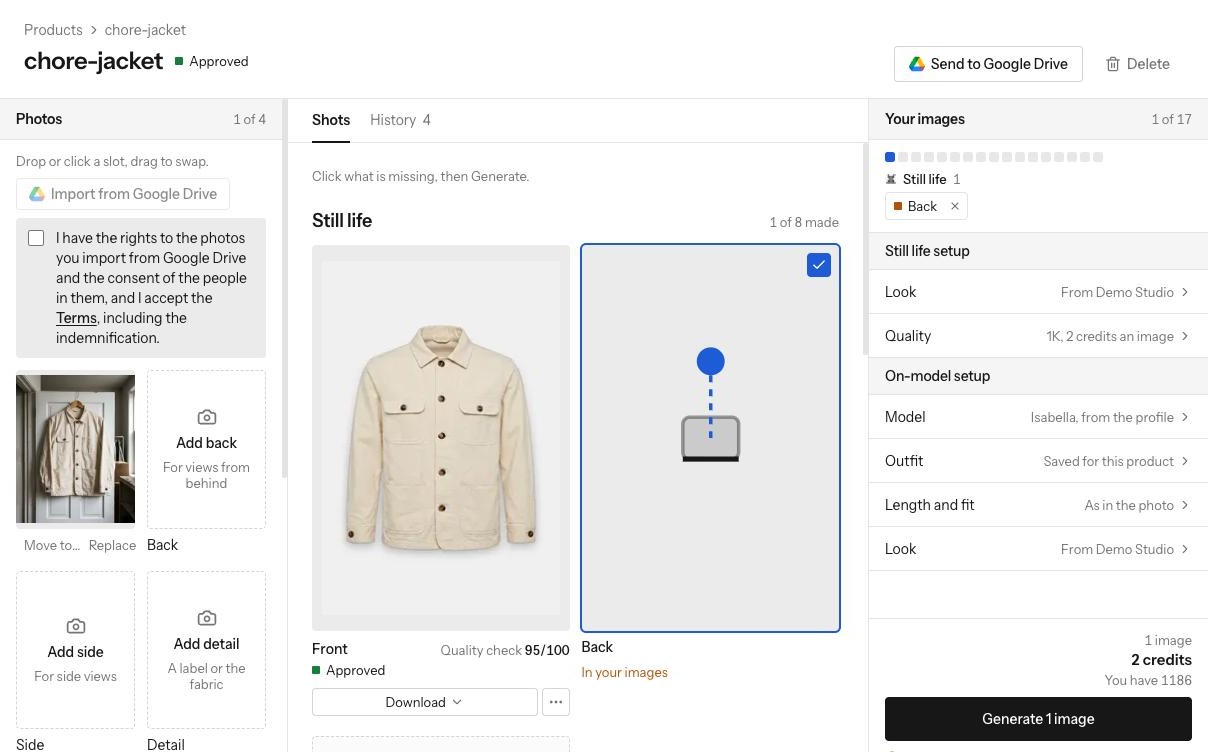
The middle of the product page shows Shots: what this product has and what it could have, for still life and on-model. Each product starts with Front and Back; the other angles and poses are under More angles and More poses.
- Click the shots that are missing. They join Your images on the right.
- Check the setup. Each row says what it is set to now and opens its options:
- Still life setup: Angles, Look (from the brand profile, or changed for this product), Quality.
- On-model setup: Model, Poses, Outfit, Length (long dresses: Mid-thigh, Knee, Mid-calf, Ankle, or As in the photo), Length and fit, Look.
- Read the cost and your balance, then choose Generate N images.
Changes made here are for this product only; the brand profile stays as it is.
The page follows the work: each shot shows Queued, Generating, then To review. You can keep adding shots while others are generating; they are queued after them.
An on-model photo is made from the product's approved front still life, which is the clean garment the model wears. Until the front still life is approved, on-model shots wait, marked "Needs an approved front". Generate the front, approve it, then make the on-model shots.
A shot no photo shows, such as a back view without a back photo, is marked "No back photo": Reica will imagine that side. Add the photo first if the back matters.
Many products: a batch
A batch is several products generated together with one brand profile. Go to Batches, choose New batch, then Generation.
1. Products
Pick products from your folders, seasons and collections (+ adds a whole folder), search by name or SKU, or filter on Never generated and Nothing approved. Your plan sets how many products a batch can hold, and the wizard says so.
2. Brand profile
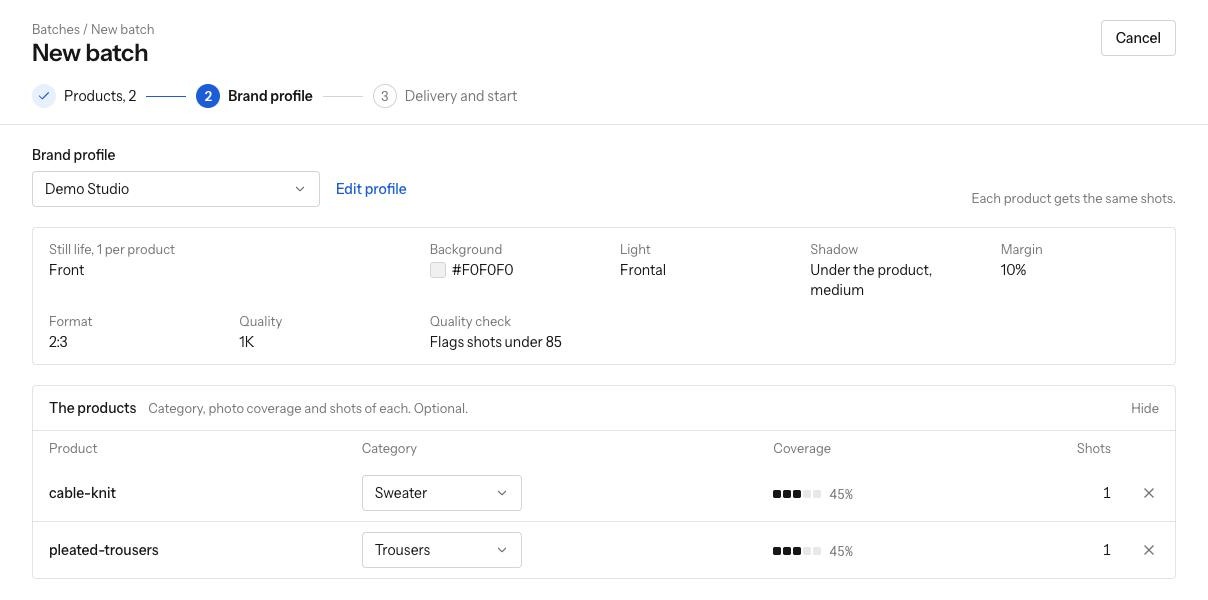
Pick the profile. Every product gets the same shots, and a summary shows what they will be: angles, background, light, shadow, margin, format, quality, poses and the quality threshold. You can change the on-model outfits for this batch only.
The table lists each product with its category, coverage and shots. A product that cannot be made yet says why: no front photo, no category, already generating, its angles already approved, or its on-model shots waiting for an approved front.
3. Delivery and start
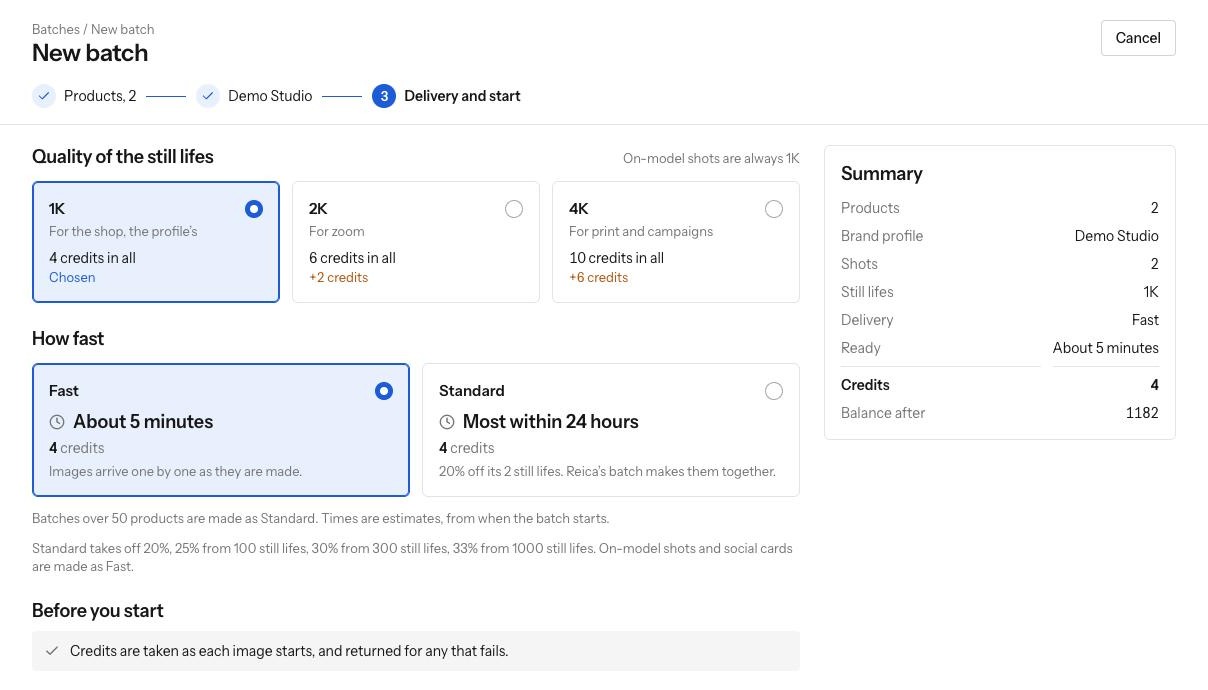
Quality of the still lifes: 1K for the shop, 2K for zoom, 4K for print and campaigns. On-model shots are always 1K.
How fast:
| Fast | Standard | |
|---|---|---|
| When | About the time shown, images arrive one by one | Most within 24 hours |
| Price | Full price | A discount on the still lifes, larger as the batch grows |
| Quality | 1K, 2K or 4K | 1K only |
| Size | Up to 50 products | Any size |
Over 50 products, a batch is made as Standard at 1K. Make 2K or 4K versions of the approved images after review. On-model shots are always made as Fast.
Before you start lists what you should know: another batch running (one batch runs at a time, this one starts after it), on-model shots waiting for a front, sides that will be imagined. Approved shots are kept, unless you tick Make them again.
The summary shows the shots, the delivery, the credits and your balance after. Choose Start batch.
When you start, Reica sets aside the whole price of the batch from your balance, so a run never stops half way because the balance ran low meanwhile. Each image is paid from it as it starts. Credits an image did not use go back when the batch ends or is cancelled, and the credits of an image that fails are returned.
The batch page
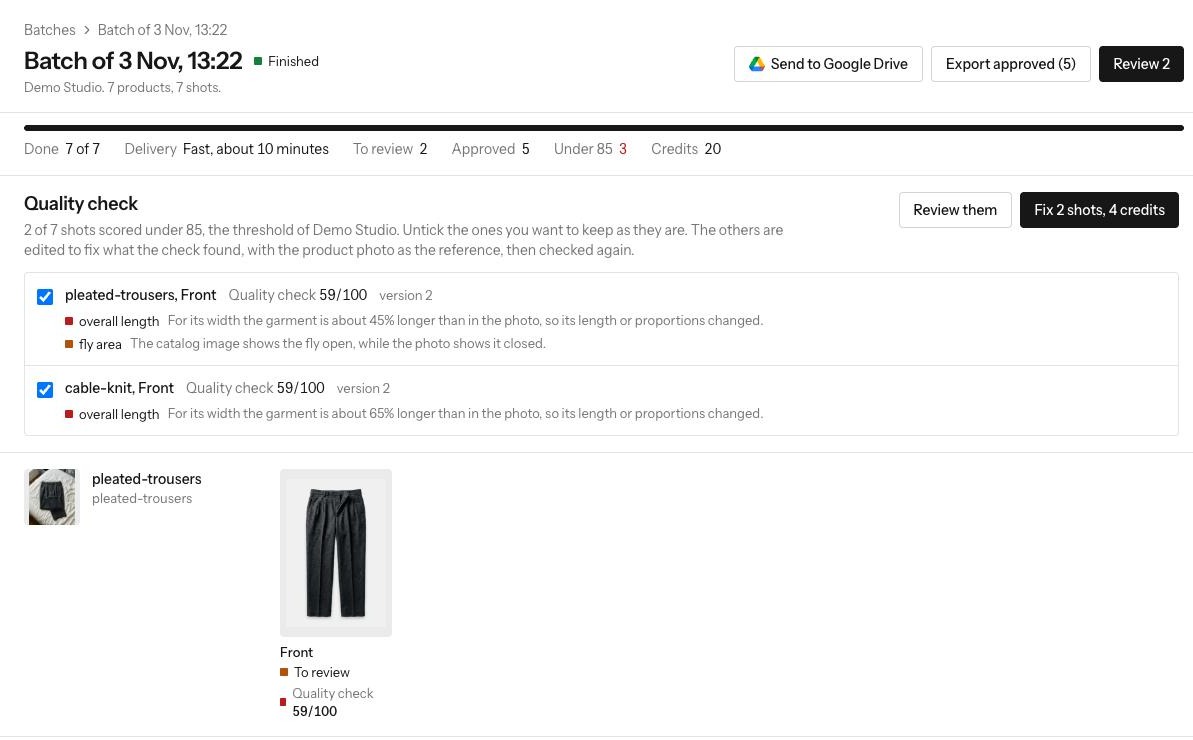
The batch page shows how far it is: done, to review, approved, not done, shots under the threshold and credits (with what was refunded). Products that need attention come first.
- Cancel batch stops the shots that have not started.
- Retry N not done makes the failed and skipped shots again.
- Review N opens the images waiting for you.
- Export approved and Send to Google Drive appear once something is approved.
When the batch is finished, a Quality check panel lists the images still under the threshold with what the check found. Untick the ones you want to keep as they are and choose Fix N shots: each one is edited to fix what was found, checked again and sent back to Review.
High resolution
An approved still life or on-model photo can get a 2K or 4K version for print, zoom and campaigns: from the shot's Download menu or the High resolution section in Review. It is drawn again with finer fabric detail, is ready in about a minute and does not go back to review. Each one is a new image in your Library.
- From an approved shot. The shot must be approved first. The 2K comes with the Growth and Pro plans, the 4K with Pro.
- The 4K is made from the 2K. Make the 2K first: the 4K button waits for it ("The 4K is made from the 2K version. Make the 2K first.").
- Checked against the approved image. Reica compares the new version with the approved image. If it drew something else (a different background, a faded garment, a second collar), it tries once more; if that fails too, the version is not kept and your credits are refunded: "The high-resolution version did not match the approved image, so it was not kept. Your credits were refunded."
- The words on the garment are checked too. If the version changes the text on the label, it is refused the same way and refunded. See Validation.
- The label. If you placed the label, the 2K gets it. Add the label to the 2K sews it into the neck as an edit.
- Price. See Pricing.