Brand profiles
A brand profile is the look of your catalog, decided once. Every product generated with it gets the same backdrop, light, format and margin, so a page of your shop lines up. You can keep several profiles, for example one for the shop and one for a campaign, and mark one as the default for new products.
Open Brand profiles in the sidebar, then New profile or Edit.
Match the look of a photo
The quickest start: in the Still life section, choose Choose a photo and give Reica a catalog photo whose look you like, yours or a reference. In a few seconds it reads the background, shadow, reflection, light, angle, format and margin, and fills them in.
It is free and the photo is not kept. Reica lists what it applied and what it did not carry over, with the reason: props, a surface, a person or a colour grade cannot be reproduced. Undo puts the profile back as it was.
You can also skip it and choose Set it up yourself.
Still life
Angles: the views each product gets.
| Group | Angles |
|---|---|
| Main | Front, Back |
| Sides | Left side, Right side, Three-quarter left, Three-quarter right |
| From above | Top, High angle |
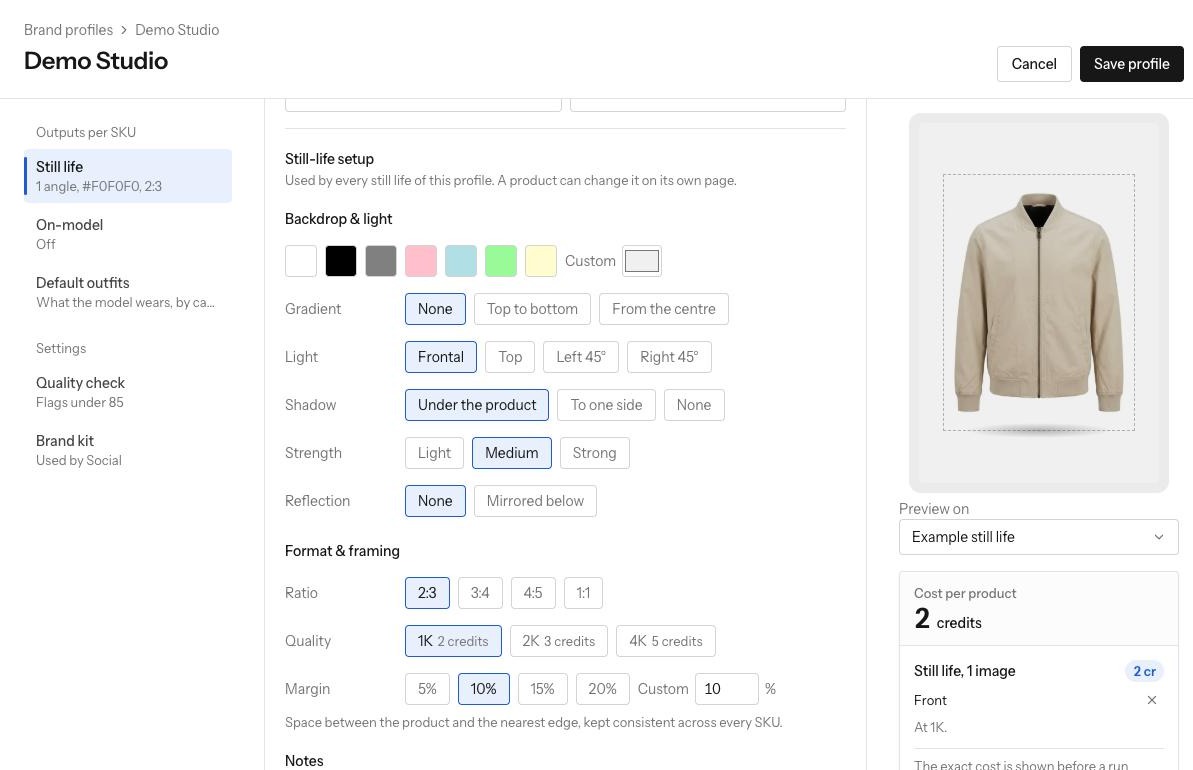
Backdrop and light
- Backdrop: White, Black, Grey, Blush, Powder blue, Mint, Cream, or any colour.
- Gradient: none, top to bottom, or from the centre, with the colour it fades to.
- Light: Frontal, Top, Left 45°, Right 45°.
- Shadow: under the product, to one side (left or right), or none, in three strengths.
- Reflection: none, or mirrored below the product.
Format and framing
- Ratio: 2:3, 3:4, 4:5 or 1:1.
- Quality: 1K, 2K or 4K, depending on your plan.
- Margin: the empty space between the product and the nearest edge: 5, 10, 15 or 20%, or your own value from 2 to 30%. The same margin is kept on every product, so a grid of products lines up.
Notes: up to 500 characters of extra direction.
On-model
On-model photos show a model wearing the product. Choose:
- Model: from the catalog of models, each shown full length, because build and height change how a garment falls. The same model wears every product of a batch; a product can pick another model on its own page.
- Poses
| Group | Poses |
|---|---|
| Full length | Front, Back, Low angle |
| Closer | Relaxed, Three-quarter, Profile, Close-up, Over the shoulder |
| Seated | Seated |
- Setup: backdrop, gradient and light (Soft front, Top, Left 45°, Right 45°), ratio and margin. The floor shadow comes from the photo itself, consistent with the light.
On-model photos are made at 1K. Once one is approved you can make a 2K or 4K version of it.
Default outfits
What the model wears with your products, one outfit per category: a top, a bottom, outerwear and footwear, picked from your Library. Reica fills the rest from your own collection. A product's own outfit, or a change made for one batch, always wins.
Quality check
Every image is scored against the product photo. Choose the threshold: Flag shots under 70, 75, 80, 85, 90 or 95. The default, 85, flags anything worth a look; lower it to see only clear problems, raise it to be stricter. An image under the threshold gets one automatic fix and a flag in Review. See Validation.
Cost per product
The editor shows what one product costs with this profile. The exact cost is shown again before every generation.