Home & Dashboard
The Home screen is your creative command centre. Everything you need is one click away.
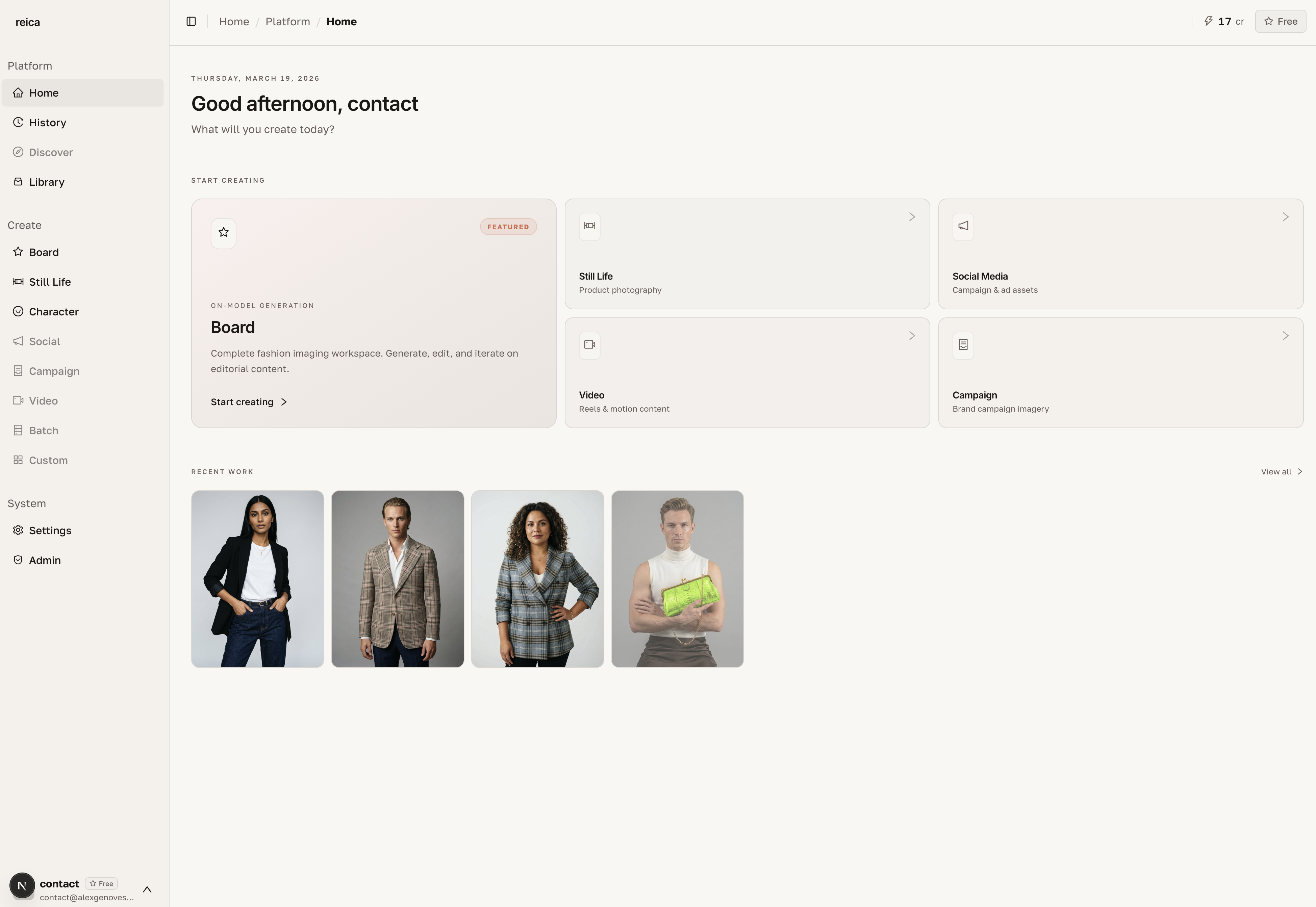
What you see on Home
The Home screen is split into two areas:
Shortcuts (top section)
Quick-launch buttons for your primary workflows:
- Still Life — open a new product photography session
- Board — create a new composition canvas
- Character — go to your character library
- Library — open your asset manager
- History — view all your past generations
Recent Generations (main area)
A scrollable grid of your most recent outputs. From here you can:
- Click any image to open it and reuse it as the base for a new generation
- See the generation details (date, settings used)
- Navigate directly to the feature used to create it
Reusing a previous generation
One of the most powerful shortcuts: click any recent image on the Home screen and you're immediately taken to the generation form with that image pre-loaded.
This is how you iterate quickly:
- Generate a first version
- Return to Home
- Click the image → the form opens with your previous settings
- Adjust one variable and regenerate
Navigation tips
- The sidebar (visible on all screens) gives you access to every tool at any time
- Your active Boards appear in the sidebar for quick switching
- The Library is always accessible without leaving your current generation